
Ideas That Power Digital Growth
Stay ahead with actionable insights, expert opinions, and practical guides covering ecommerce trends, platform updates, automation, AI, and real-world solutions to help businesses grow and scale digitally.
02/16/2026

HubSpot Vendor Management with Seamless CS-Cart Integration
Sync vendor profiles, performance metrics, products, and communications automatically to optimize vendor relationships and marketplace operations.HubSpot Vendor Connector - For Marketplace Vendors
As a vendor on our marketplace, the HubSpot Vendor Connector empowers you to connect your personal HubSpot account and automatically sync your products, customers, and orders. Take control of your vendor business by maintaining a unified view of all your marketplace data in HubSpot. Grow your business faster with automated data synchronization, powerful marketing automation, and real-time customer insights - all while keeping your data secure with industry-standard OAuth 2.0 authentication.
Key Features for Vendors
Personal HubSpot Account Connection:
Connect your own HubSpot account securely and keep your business data completely private and under your control.
Connect your own HubSpot account securely and keep your business data completely private and under your control.
Automatic Product Sync:
Your marketplace products automatically sync to HubSpot with pricing, inventory, and complete product details in real-time.
Your marketplace products automatically sync to HubSpot with pricing, inventory, and complete product details in real-time.
Customer Data Synchronization:
All your customers from the marketplace sync to HubSpot contacts, giving you a complete customer database.
All your customers from the marketplace sync to HubSpot contacts, giving you a complete customer database.
Order Management:
Every order appears as a deal in your HubSpot pipeline, with status updates that automatically reflect marketplace changes.
Every order appears as a deal in your HubSpot pipeline, with status updates that automatically reflect marketplace changes.
Marketing Automation:
Create targeted email campaigns in HubSpot based on customer behavior, purchase history, and engagement patterns.
Create targeted email campaigns in HubSpot based on customer behavior, purchase history, and engagement patterns.
Secure OAuth 2.0 Authentication:
Industry-standard secure connection ensures your HubSpot data and marketplace information are protected.
Industry-standard secure connection ensures your HubSpot data and marketplace information are protected.
How to Connect Your HubSpot Account
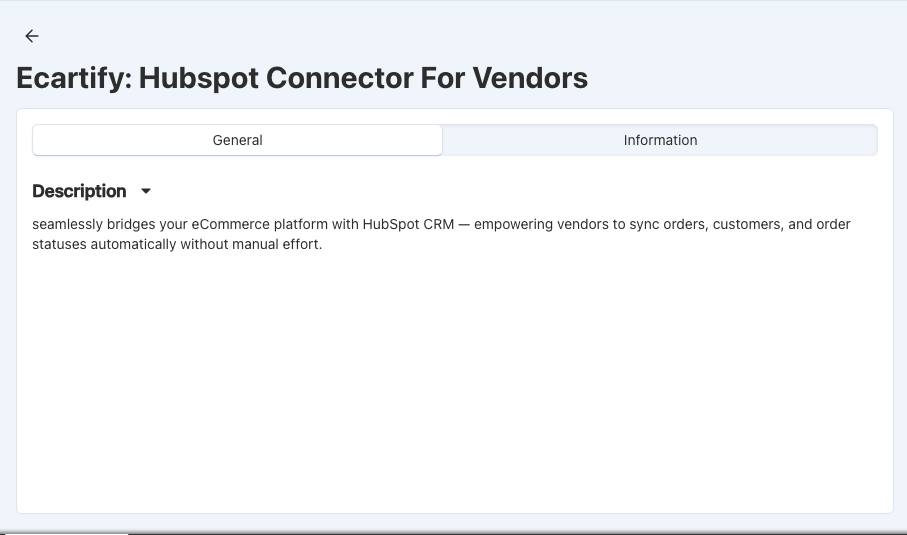
Step 1: Access Your Vendor Dashboard
Log in to your vendor account and find the HubSpot Connector option:
Log in to your marketplace vendor account
Navigate to Integrations or Settings
Look for "HubSpot Vendor Connector"
Click to open the connector setup
The connector interface is simple and designed specifically for vendors like you!
Step 2: Create a HubSpot Private App
You'll need to create a Private App in your HubSpot account to allow the marketplace to sync your data:
Go to HubSpot: Visit app.hubspot.com and log in to your account
Navigate to Settings: Click your account name → Settings
Find Integrations: Go to Integrations → Private Apps
Create New App: Click "Create app" and give it a name like "Marketplace Sync"
Set Permissions: Select permissions for contacts, companies, deals, products, and custom objects
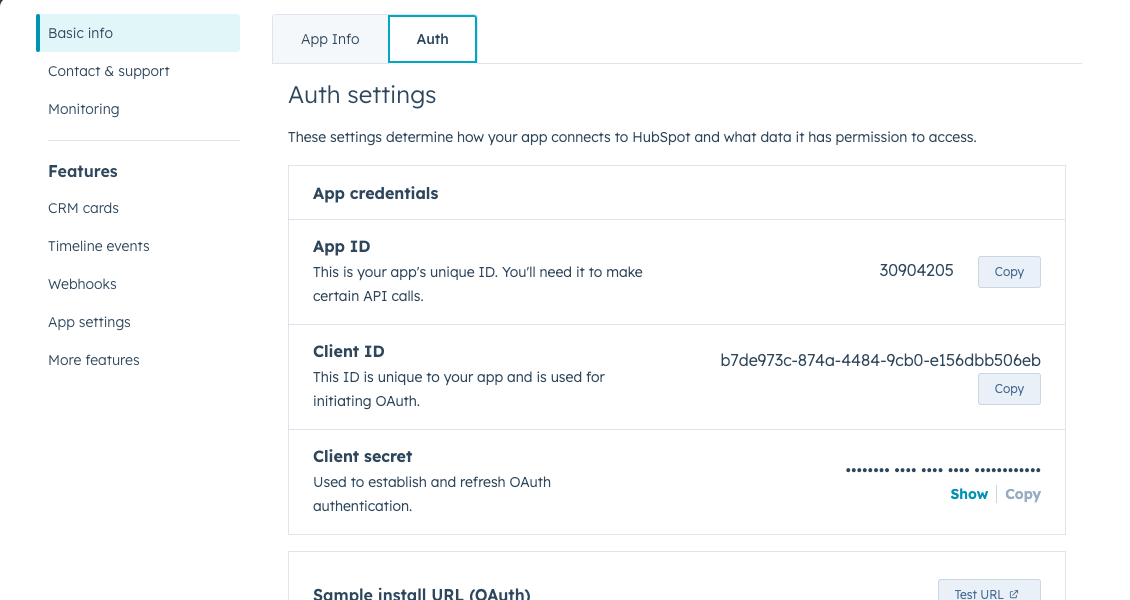
Create Token: Click "Create" and copy your app ID and secret
Step 3: Enter Your HubSpot Credentials
Paste your HubSpot credentials into the vendor connector:
Paste App ID: Copy the Client ID from your HubSpot Private App
Paste Secret Key: Copy the Client Secret from HubSpot (keep this secure!)
Click Save: Your credentials are encrypted and stored securely
Confirmation: You'll see "Credentials saved successfully" message
Your HubSpot credentials are encrypted using enterprise-grade security.
Step 4: Authorize the Connection
Complete the secure OAuth connection to your HubSpot account:
1. Copy the Callback URL and paste in the app that you created.(You can find in connection page)
2. Copy the Auth URL in HubSpot App
3. Open it in Same browser where your vendor login.
4. Grant Permissions: Review and approve the requested permissions
5.Return & Confirm: You'll be redirected back showing "Connected to HubSpot"

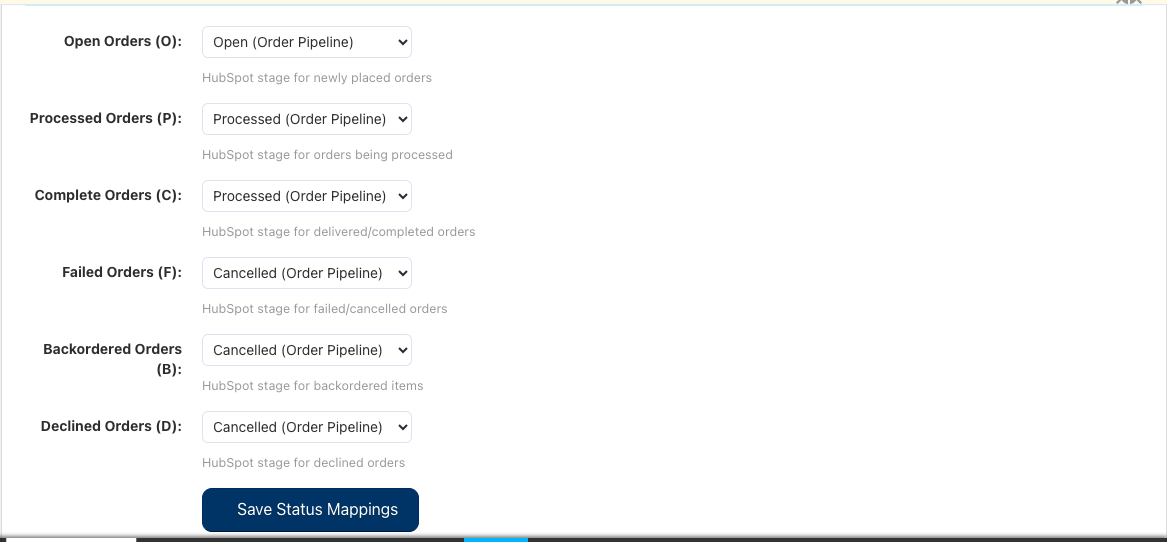
Step 5: Configure Order Status Mapping
Map your marketplace order statuses to HubSpot deal stages so your pipeline reflects your real business:
Pending Orders: Choose which HubSpot stage represents new orders
Processing Orders: Select the stage for orders being prepared
Shipped Orders: Define stage for orders that have shipped
Delivered Orders: Set stage for completed deliveries
Cancelled Orders: Choose stage for cancelled orders
Click "Save Configuration" to apply your status mapping.
Step 6: Sync Your Products
Start synchronizing your marketplace products to HubSpot:
Go to Products Section: Click "Products" in the connector
Sync All Products: Click "Sync All Products" to sync your entire catalog
Monitor Progress: Watch the sync status as your products are added to HubSpot
View in HubSpot: Log into HubSpot and see your products in the Products tab
Your products stay synchronized, allowing you to manage inventory and create targeted marketing campaigns.
Step 7: AutoSync Your Customers
Bring all your marketplace customers into HubSpot for better relationship management:
Step 8: Sync Your Orders
Get your complete order history into HubSpot as deals in your sales pipeline:
Go to Orders: Click "Orders" in the connector
Sync Order History: Click "Sync All Orders" to import all past orders
See Pipeline: Orders appear as deals in your HubSpot sales pipeline
Real-time Updates: New marketplace orders automatically appear in HubSpot
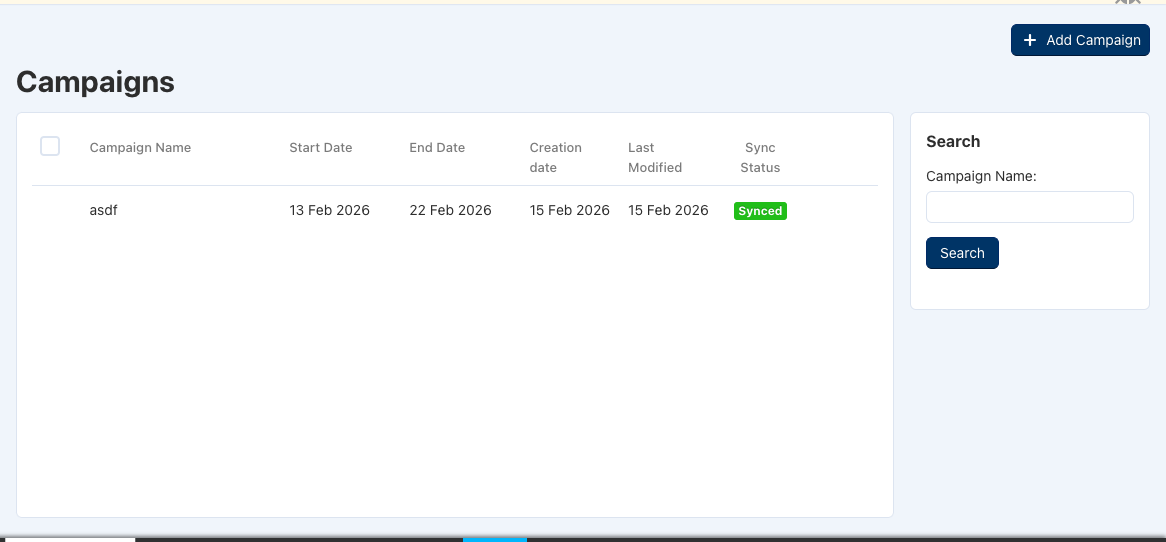
Step 9: Create Marketing Campaigns
Use HubSpot's powerful marketing tools to grow your vendor business:
In HubSpot, Create Campaigns: Use your synced customer list
Segment Customers: Target by purchase history, location, or product interest
Send Email Campaigns: Promote new products and special offers
Track Results: See open rates, click rates, and sales impact
Your customers and products are now synchronized - you can leverage HubSpot's full marketing power!
What Gets Synchronized?
When you connect HubSpot, these marketplace items automatically sync to your HubSpot account:
Your Products → HubSpot Products
Product names, descriptions, and images
Pricing and inventory information
Product categories and attributes
Your Customers → HubSpot Contacts
Customer names and email addresses
Contact information and addresses
Complete purchase history
Your Orders → HubSpot Deals
Order details and order totals
Products ordered and quantities
Order status and shipping information
Marketing Campaigns → HubSpot
Create and manage email campaigns
Send targeted messages to your customers
Track campaign performance and results
How This Helps Your Vendor Business
Grow Your Business
Marketing Automation: Send targeted emails to customers based on purchase history
Customer Insights: Understand what your customers buy and when
Sales Pipeline: See all your orders organized in a sales pipeline view
Save Time
Automatic Syncing: No manual data entry needed
Real-time Updates: Your HubSpot data is always current
Focus on Selling: Spend time on growing your business, not managing data
Better Customer Relationships
Complete Customer View: See all interactions and purchases in one place
Personalized Communication: Send messages tailored to each customer
Track Engagement: Know which customers are most active
Professional Business Tool
Industry Standard CRM: HubSpot is used by thousands of businesses
Powerful Features: Email marketing, sales pipeline, analytics, and more
Grow with Confidence: Professional tools to help scale your vendor business
Your Data is Secure
Private HubSpot Account: Only you can access your data
Secure Connection: Industry-standard OAuth 2.0 encryption
Full Control: Disconnect anytime - your data is yours
Common Questions
Do I need a HubSpot account?
Yes, you'll need to create a HubSpot account (free tier available). HubSpot offers a free CRM with email marketing, contact management, and deal tracking - perfect for growing your vendor business.
Is my data secure?
Absolutely. We use industry-standard OAuth 2.0 authentication. Your HubSpot account is private and only you can access it. You can disconnect anytime.
How often does data sync?
New orders, customers, and products sync automatically in real-time. Your HubSpot account always has the latest data from the marketplace.
Can I disconnect later?
Yes, anytime. If you disconnect, the sync stops but your HubSpot data remains in your account. You maintain full control.
Do I have to sync everything?
You can choose what to sync. You can sync products without orders, or customers without campaigns - it's completely flexible based on your needs.
Ready to Take Your Vendor Business to the Next Level?
The HubSpot Vendor Connector is designed to help you grow your marketplace business. By connecting your personal HubSpot account, you get access to powerful marketing, sales, and customer management tools - all synchronized with your marketplace data in real-time.
What you gain:
✓ A complete view of your customers and orders
✓ Powerful email marketing tools
✓ Sales pipeline to track your growth
✓ Customer insights to drive business decisions
✓ Professional business management tools
✓ Full control over your data
Ready to connect? Click the button above to get started. The setup takes just minutes, and you'll immediately start seeing the benefits. If you have any questions, our support team is here to help!
Start growing your vendor business today with HubSpot!