
AI-Powered Product
Video Generator
Get Started
Ecartify: AI Powered Product Video Generator – Generate Professional Product Videos Automatically Using Sora, Kling AI & ChatGPT
Stop losing customers to stores with better visual content. The AI Powered Product Video Generator addon transforms your static product images into engaging, high-quality AI-generated videos — fully automatically. The addon now supports two industry-leading video engines: OpenAI Sora, our new recommended provider for the most realistic, cinematic results, and Kling AI, a fast and flexible alternative. Combined with OpenAI ChatGPT for intelligent prompt writing, this addon creates professional product videos in seconds. Whether you need bulk video generation across your entire catalog or individual videos per product, AI Powered Product Video Generator handles everything from prompt creation to video delivery — right inside your CS-Cart admin panel.
Key Features of AI Powered Product Video Generator
Choose Sora as your video engine for the most realistic, cinematic product videos. Sora is now the recommended provider for stores that want the highest quality output.
Switch between Sora and Kling AI at any time from a single Video Provider dropdown — no need to reconfigure your whole store, just pick the engine that fits each campaign.
Still fully supported — Kling AI's industry-leading image-to-video technology produces smooth, cinematic product videos from a single product image.
Optionally connect your OpenAI API key and let GPT-4o automatically write detailed, creative video prompts tailored to each product — used for both Sora and Kling generations.
Select multiple products at once, generate prompts in batch, review them, then fire off all video generations in a single click, using whichever provider is active.
Generate or regenerate a video for any individual product directly from its product edit page — with full control over the prompt and provider.
Choose the output resolution for Sora-generated videos, up to a maximum of 1920x1080, so quality matches your store's needs.
When using Kling AI, choose between Kling v2 Master and other available models, plus Standard or Pro generation mode.
Set video length independently for each provider — Sora and Kling both support multiple duration options to match your use case.
Control how closely the video follows the prompt (0.0–1.0). Default 0.5 provides a balanced, natural result.
Every generated video — whether from Sora or Kling — shows estimated cost and usage, so you always know what you're spending.
Step-by-Step Setup Guide
Step 1: Install the Addon
Get AI Powered Product Video Generator running on your CS-Cart store in just a few minutes:
Once activated, go to Add-ons → AI Powered Product Video Generator and click the Settings tab to configure your video engine and API connections.
Step 2: Choose Your Video Provider & Connect ChatGPT
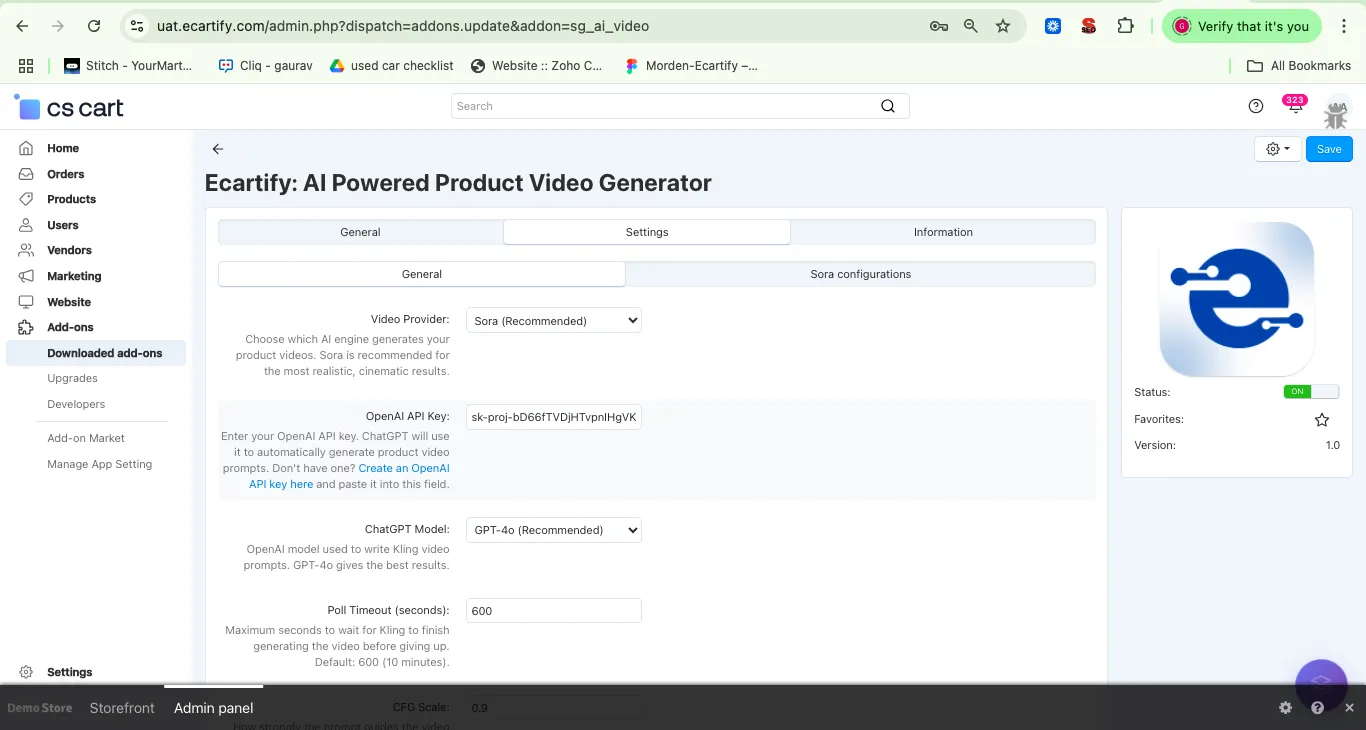
Inside the Settings tab, open the General sub-tab. This is where you pick which AI engine generates your videos and connect ChatGPT for automatic prompt writing:
Choose which AI engine generates your product videos. Select Sora (Recommended) for the most realistic, cinematic results, or choose Kling AI if you prefer that engine. You can switch providers at any time.
Optional but highly recommended. Enter your OpenAI API key. ChatGPT will use it to automatically generate product video prompts for whichever provider you've selected. Don't have one? Create an OpenAI API key and paste it into this field.
Select the OpenAI model used to write your video prompts. GPT-4o (Recommended) gives the best results — it understands product context and writes cinematic, visually descriptive prompts.
Maximum time the addon will wait for the selected provider to finish generating a video before giving up. Default is 600 seconds (10 minutes). For longer videos or heavy server load, you may want to increase this value.
Controls how strongly the prompt guides the generation (range: 0.0–1.0). A value of 0.5 is a balanced default that produces natural results.
Step 3: Configure Sora (If Selected as Provider)
If you chose Sora as your Video Provider in Step 2, switch to the Sora configurations sub-tab to fine-tune output quality:
Set the output resolution for Sora-generated videos. Options go up to 1920x1080, the maximum resolution Sora 2 supports — ideal for hero products and high-quality storefront displays.
Choose the length of the generated video in seconds when using the Sora provider. Longer durations give more room for cinematic motion but may use more of your OpenAI usage quota.
Step 4: Configure Kling AI (If Selected as Provider)
If you chose Kling AI as your Video Provider instead, switch to the Kling configurations sub-tab. You'll need a free account at kling.ai/dev to get your API credentials:
Your Kling AI Access Key from the developer dashboard at
https://kling.ai/dev. Sign up for a free account to get started — Kling offers pay-as-you-go credits with no monthly commitment.
Your Kling AI Secret Key. Keep this private — it is used to sign API requests securely. Never share this key publicly or commit it to source control.
Select the Kling AI model for video generation. Kling v2 Master is recommended for the highest quality output. Other models are available for faster or cheaper generation.
Choose Standard for faster, more affordable videos or Pro for premium cinematic quality. Standard works great for most catalog products; use Pro for hero or featured products.
Set the length of generated videos in seconds when using the Kling provider — typically 5 or 10 seconds. Longer videos consume more Kling credits.
Step 5: Generate Videos in Bulk
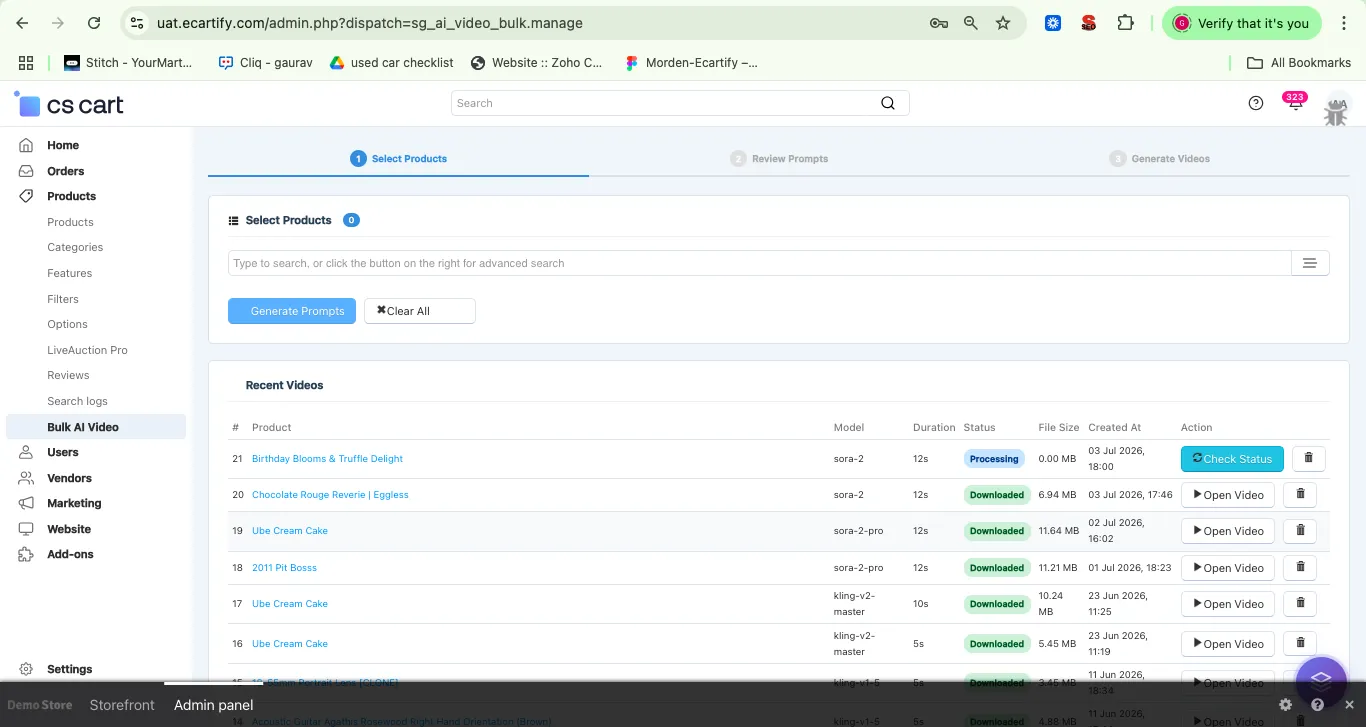
The Bulk AI Powered Product Video Generator tool is the fastest way to create videos for your entire catalog, using whichever provider you configured. Navigate to Products → Bulk AI Powered Product Video Generator in the left sidebar:
Use the search bar or advanced filter to find and select the products you want to generate videos for. The counter shows how many products are selected.
Click Generate Prompts — if OpenAI is configured, ChatGPT will automatically write a unique video prompt for each selected product. This takes a few seconds per product.
Move to the Review Prompts step to check every prompt before generation. You can manually edit any prompt or click Regenerate to get a fresh version from ChatGPT.
Click Create All Videos to send all products to your selected provider — Sora or Kling AI — simultaneously. Track progress in real-time with the Ready / Done / Failed counter at the bottom.
Step 6: Generate a Video for a Single Product
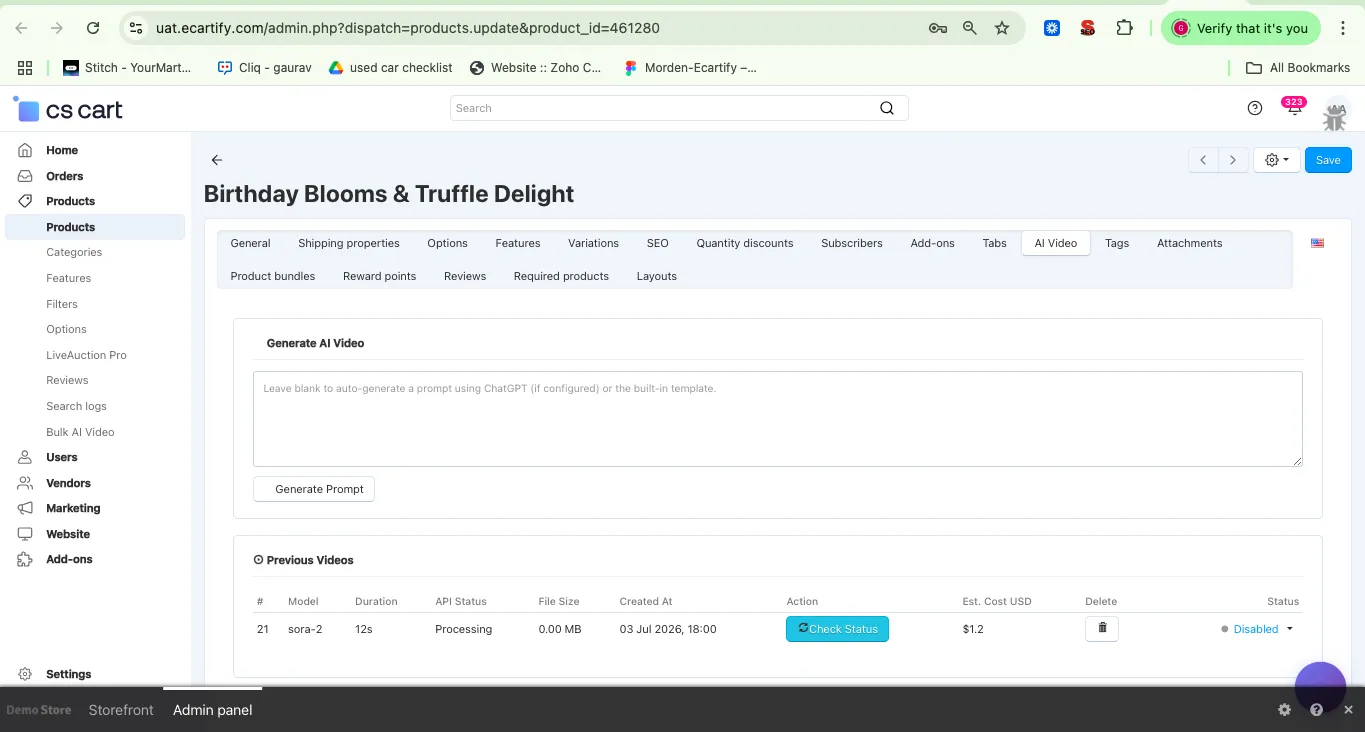
Need to create or update a video for just one product? Every product edit page now has a dedicated AI Powered Product Video Generator tab:
Go to Products → Products, open any product, and click the AI Powered Product Video Generator tab in the product edit navigation bar.
Leave the prompt field blank to auto-generate using ChatGPT (if configured), or type your own custom prompt. Click Generate Prompt to have ChatGPT fill it in for you.
All previously generated videos for that product are listed below with provider used, model, duration, API status, file size, creation date, estimated cost (USD), and credits used.
Use the Status dropdown to mark any generated video as Active — the active video will be displayed on the product page in your storefront, regardless of which provider generated it.
Step 7: See Your Videos Live on the Storefront
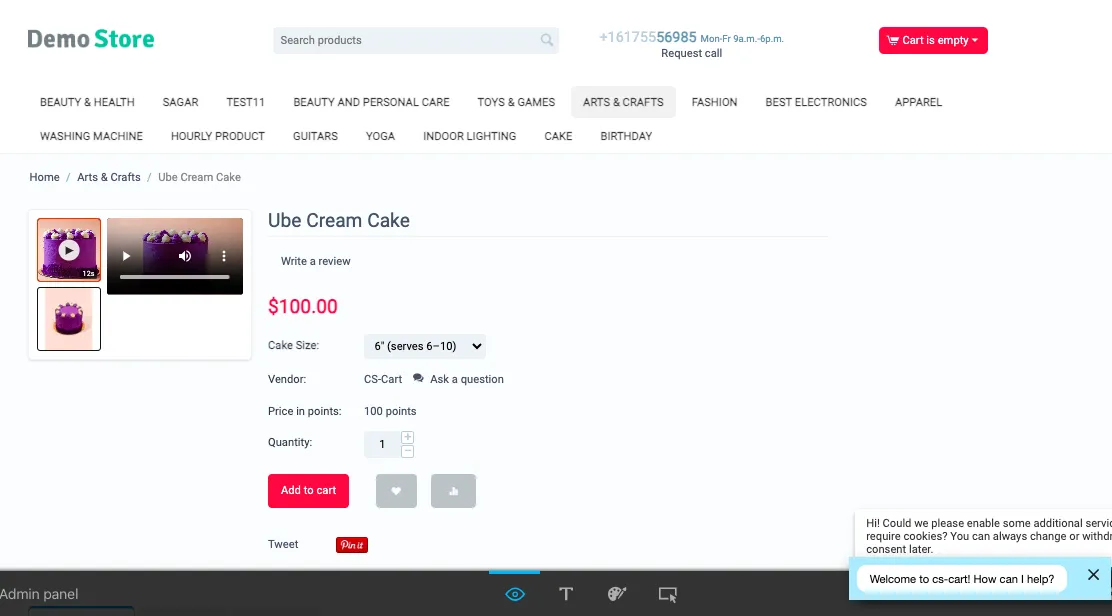
Once a video is generated and marked as Active, it appears automatically on your product page — no theme changes needed, no matter which provider created it:
Generated videos appear alongside product images in the main product gallery. Customers see a play button thumbnail and can click to watch the video without leaving the product page — keeping them engaged and informed.
You can generate multiple videos per product over time — even mixing Sora and Kling generations — and switch between them. Run new generations when you update product images, launch seasonal campaigns, or want to test different video styles.
The Bulk AI Powered Product Video Generator page shows a Recent Videos table with all generated videos across your store — including product name, provider, model used, duration, status, file size, creation date, and an Open Video button to preview any video instantly.
How Sora Brings Your Products to Life
Sora is OpenAI's advanced video generation model, and it's now the recommended engine inside AI Powered Product Video Generator for stores that want the most realistic, cinematic results.
Sora is recommended for its realistic motion, lighting, and depth — producing product videos that feel like they were shot by a professional videographer rather than generated by AI.
Sora supports resolutions up to 1920x1080, so you can generate crisp, high-definition videos for hero products, featured campaigns, and premium listings.
Choose the video length that fits your use case — shorter clips for quick product previews, longer durations for more detailed showcases.
How Kling AI Brings Your Products to Life
Kling AI remains fully supported as an alternative video engine. It doesn't just pan or zoom — it creates genuine motion, depth, and cinematic movement from a single still image.
Kling AI analyzes your product image and the written prompt, then generates a smooth video sequence where the product appears to move, shift, or be showcased in a dynamic environment — far beyond simple GIF animations.
The v2 Master model produces high fidelity output with natural motion, accurate lighting, and realistic depth. A great fit for fashion, electronics, home decor, and lifestyle products.
Kling operates on a pay-per-use credit system. A typical 5-second video uses approximately 10 credits (~$0.14 USD). Visit kling.ai/dev/pricing for the full pricing breakdown.
How ChatGPT Writes Perfect Video Prompts
A great video starts with a great prompt. AI Powered Product Video Generator uses GPT-4o to write detailed, cinematic prompts that give your selected engine — Sora or Kling AI — exactly the right instructions to showcase each product beautifully.
ChatGPT reads your product's name, description, and category context to write a prompt that makes sense for that specific item. A camera lens gets a different prompt than a dress or a kitchen appliance — each tailored to highlight the product's key appeal.
GPT-4o writes prompts using professional videography vocabulary — camera movements, lighting conditions, scene transitions, and mood descriptions — giving both Sora and Kling AI the richest possible instruction set.
Every auto-generated prompt is fully editable before you fire off the generation. Review it in the prompt field, adjust the tone or focus, or click Regenerate to get a completely fresh version. You stay in full creative control.
Real-World Benefits & Results
Increase Product Page Conversion
Save Time & Cut Production Costs
Choose the Right Engine for Every Campaign
Full Control, Zero Complexity
Transform Your Product Pages With AI-Generated Video — Starting Today
Your customers are buying from stores with better visual content. AI Powered Product Video Generator now gives you two industry-leading engines — Sora and Kling AI — to compete, without a studio, a videographer, or a big budget.
Pro Tip: Start by running Bulk AI Powered Product Video Generator on your top 20 best-selling products with Sora (Recommended) selected as your provider for the highest quality results. Enable GPT-4o for auto-prompt generation — it saves time and consistently produces better prompts than manual writing. If you need faster, lower-cost videos at higher volume, switch the Video Provider to Kling AI with Standard mode. Once you see the conversion uplift on those hero products, roll out video generation across your full catalog.