
Flutterwave Payment: Simple Payments & Powerful Subscriptions
Accept one-time payments and recurring subscriptions with flexible plans — daily, weekly, monthly, quarterly, and yearly.Ecartify: Flutterwave Payment Gateway
Modern e-commerce isn't just about selling products once—it's about building recurring revenue streams through subscriptions, memberships, and repeat purchases. Businesses need payment solutions that handle both simple one-time transactions and complex recurring billing with ease.
Traditional payment gateways force you to choose between basic payments or expensive third-party subscription management tools, creating complexity, higher costs, and poor customer experiences.
That's exactly why we built Ecartify: Flutterwave Payment Gateway — a comprehensive payment solution that combines simple product payments with powerful subscription management, all integrated seamlessly into CS-Cart with flexible billing cycles from daily to yearly.
Key Features of Flutterwave Payment Gateway
Unlike traditional payment gateways that only handle basic transactions, our Flutterwave integration gives you complete flexibility to sell products as either one-time purchases or recurring subscriptions.
- Process standard one-time product purchases
- Enable subscription-based recurring payments per product
- Let customers choose between purchase or subscribe
- Mix regular and subscription products in the same store
- Toggle subscription mode on/off per product easily
This dual-mode approach gives you ultimate control over your revenue model without needing multiple payment systems.
Create subscription plans that match your business model perfectly. Our addon supports five different billing frequencies to accommodate any subscription strategy.
Available Subscription Plans:
Each plan can have custom pricing, iteration limits, and individual activation status—giving you complete control.
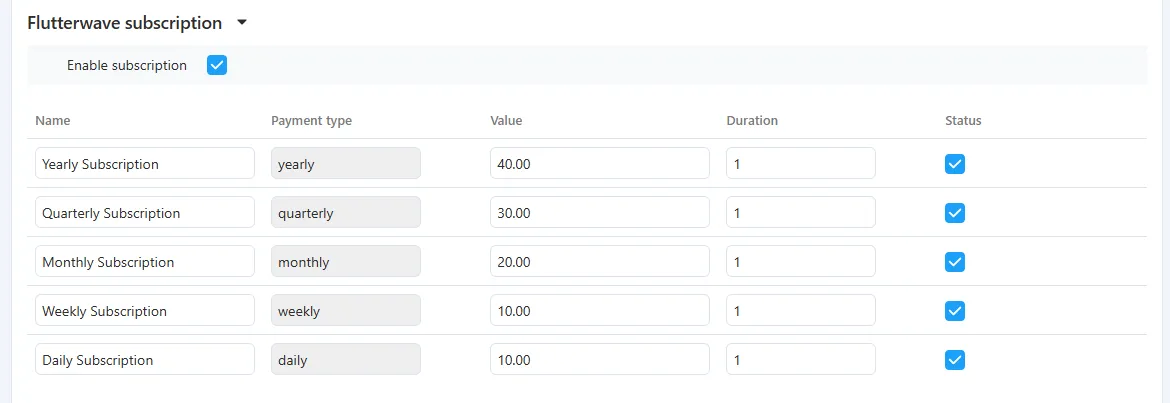
For each product, create and manage multiple subscription plans with detailed control over pricing, duration, and billing cycles.
- Plan Name: Create custom names like "Premium Monthly" or "Basic Weekly"
- Plan Type: Select from daily, weekly, monthly, quarterly, or yearly
- Subscription Amount: Set the recurring price per billing cycle
- Number of Iterations: Define how many billing cycles (e.g., 12 months, unlimited)
- Status: Activate or deactivate plans individually
All plan details are managed through an intuitive subscription plan table directly in the product editor.
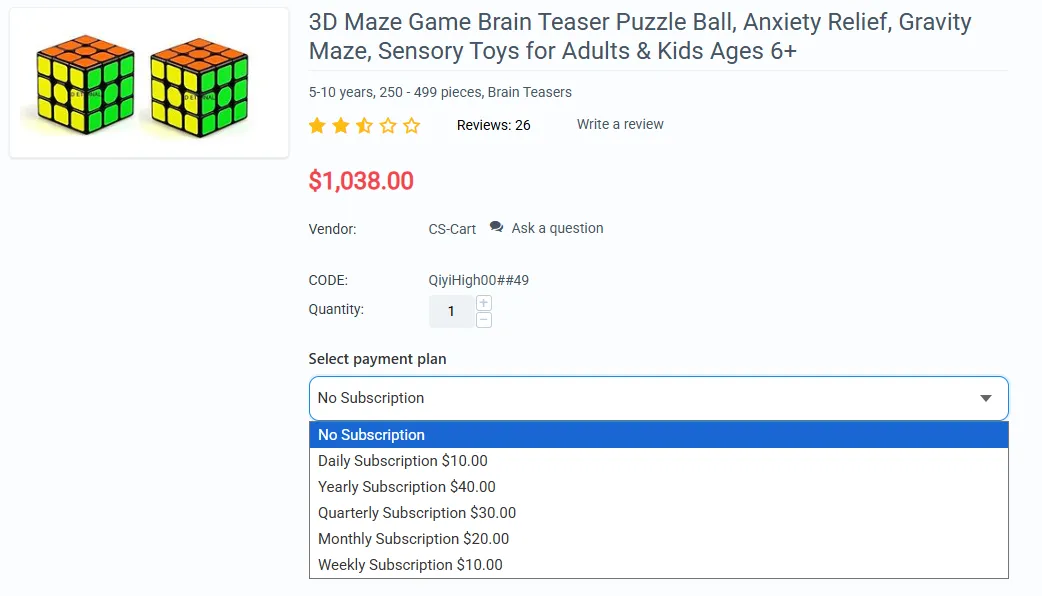
When subscriptions are enabled for a product, customers see clear subscription options on the product detail page, making it easy to choose their preferred plan.
- Subscription plans displayed clearly on product page
- "No Subscription" option available for one-time purchase
- All active plans shown with pricing and frequency
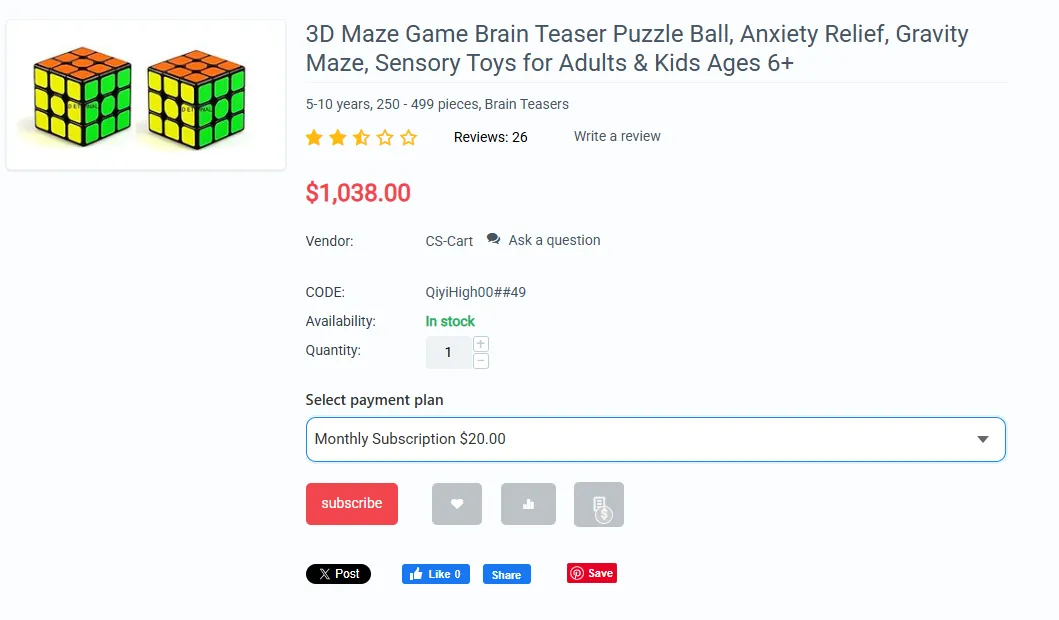
- Selected plan pricing automatically applied to cart
- Clear indication of billing frequency and total iterations
- Seamless checkout process with Flutterwave
Customers can easily understand and select the subscription that fits their needs without any confusion.
Once a customer subscribes, the system automatically handles recurring billing according to the selected plan schedule.
- Automatic recurring charges based on plan frequency
- Iteration counter tracks completed billing cycles
- Subscription automatically ends after set iterations
- Failed payment retry logic built-in
- Email notifications for successful charges
- Complete payment history for each subscription
Set it and forget it—the system handles all recurring billing automatically.
Admins get a specialized backend interface to monitor and manage all subscription-based orders separately from regular orders.
- Access via Orders → Flutterwave Subscription Orders
- View all active and completed subscriptions
- Track completed iterations for each subscription
- Monitor subscription status and payment history
- See customer subscription details at a glance
- Export subscription data for reporting
Complete visibility into your recurring revenue stream with professional subscription management tools.
Step-by-Step Setup Guide
Step 1: Install & Configure the Addon
Setting up Flutterwave payment gateway with subscription support is straightforward:
Get your API keys from your Flutterwave dashboard at flutterwave.com
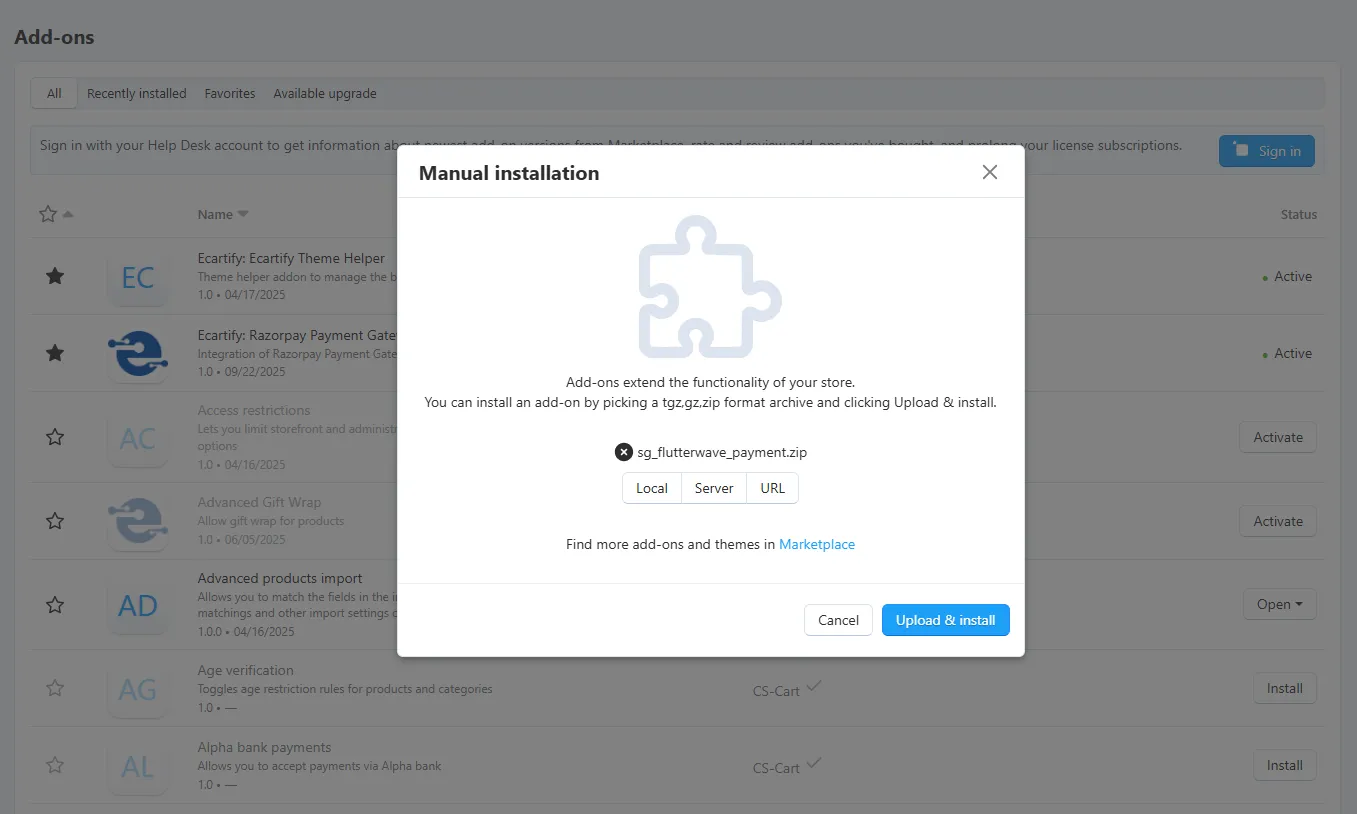
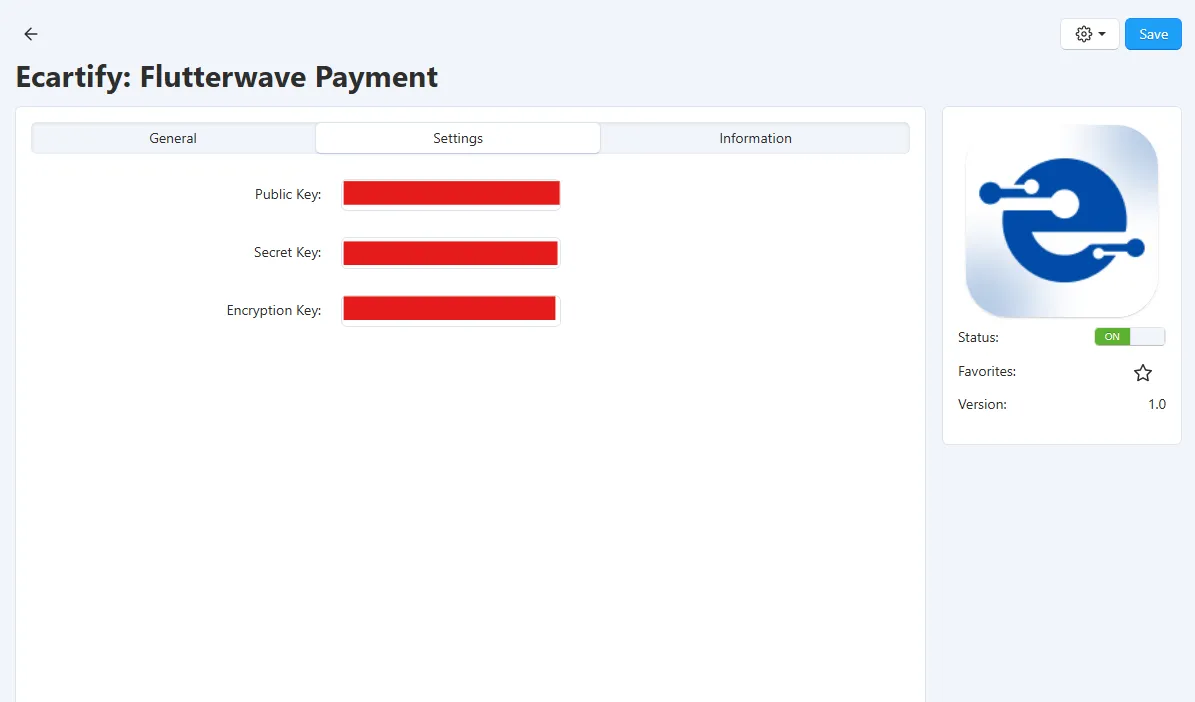
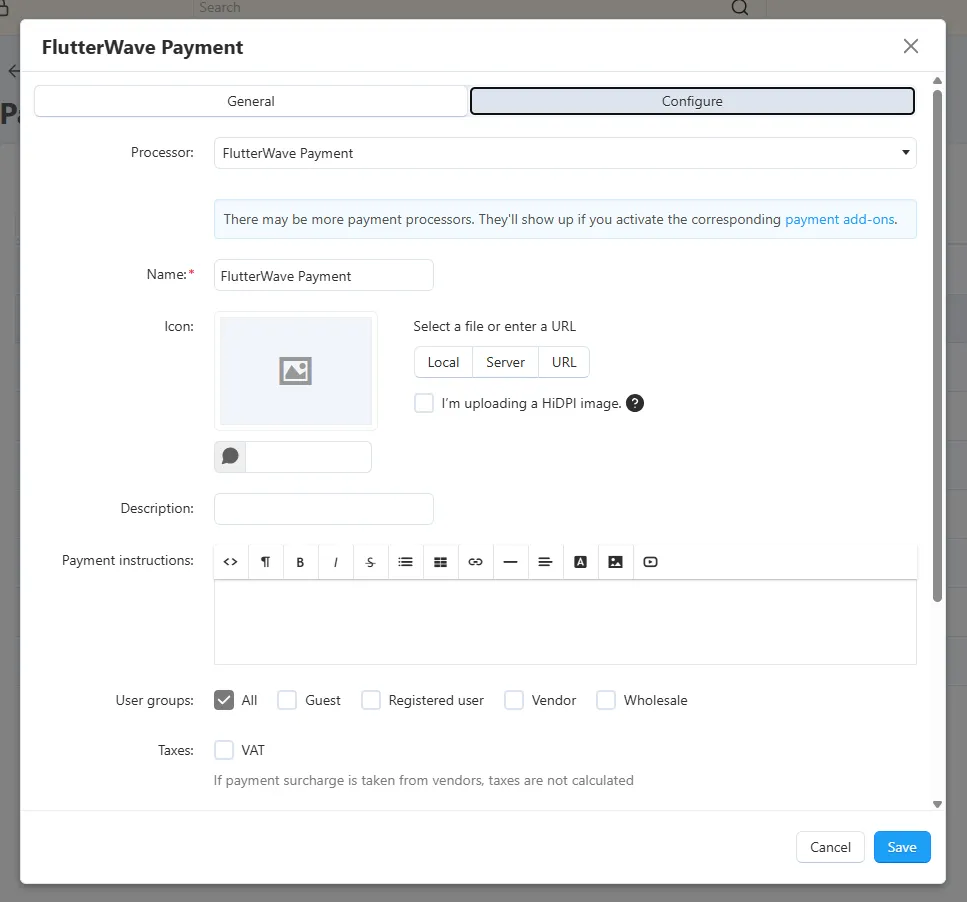
Step 2: Enable Subscriptions for Products
To make a product available as a subscription, you need to enable the subscription feature:
Note: You can enable subscriptions on some products while keeping others as regular one-time purchases.
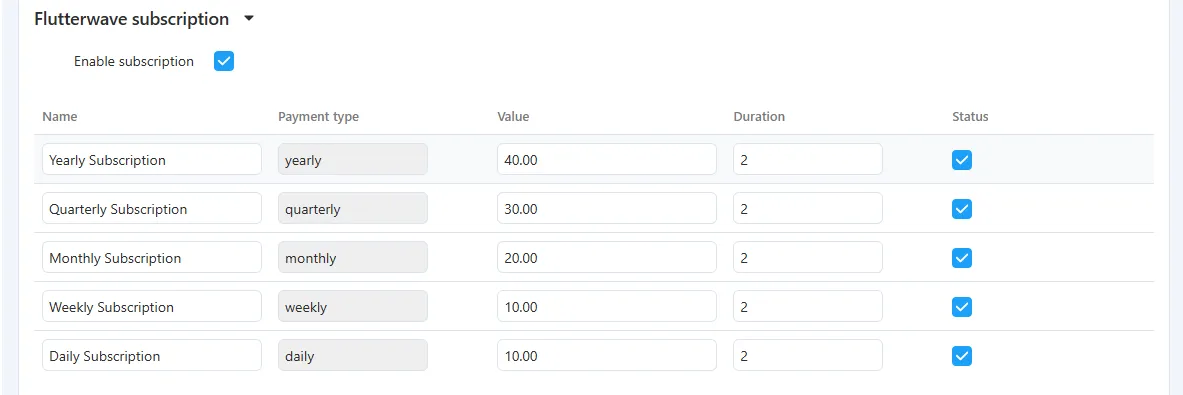
Step 3: Configure Subscription Plans for a Product
Subscription plans are configured directly inside each product's edit page. Here's how to set them up:
| Field | Description | Example |
|---|---|---|
| Name | Custom label shown to customer | Yearly Subscription |
| Payment Type | Auto-filled, read-only (yearly / quarterly / monthly / weekly / daily) | yearly |
| Value | Subscription amount charged per cycle | 40.00 |
| Duration | Number of billing iterations | 1 |
| Status | Checkbox to activate or deactivate this plan | ✔ Enabled |
Note: The Payment Type column is read-only and auto-filled by the system. You only need to set the Name, Value, Duration, and Status for each plan.
Step 4: How It Works for Customers
Here's the complete customer experience from browsing to subscribing:

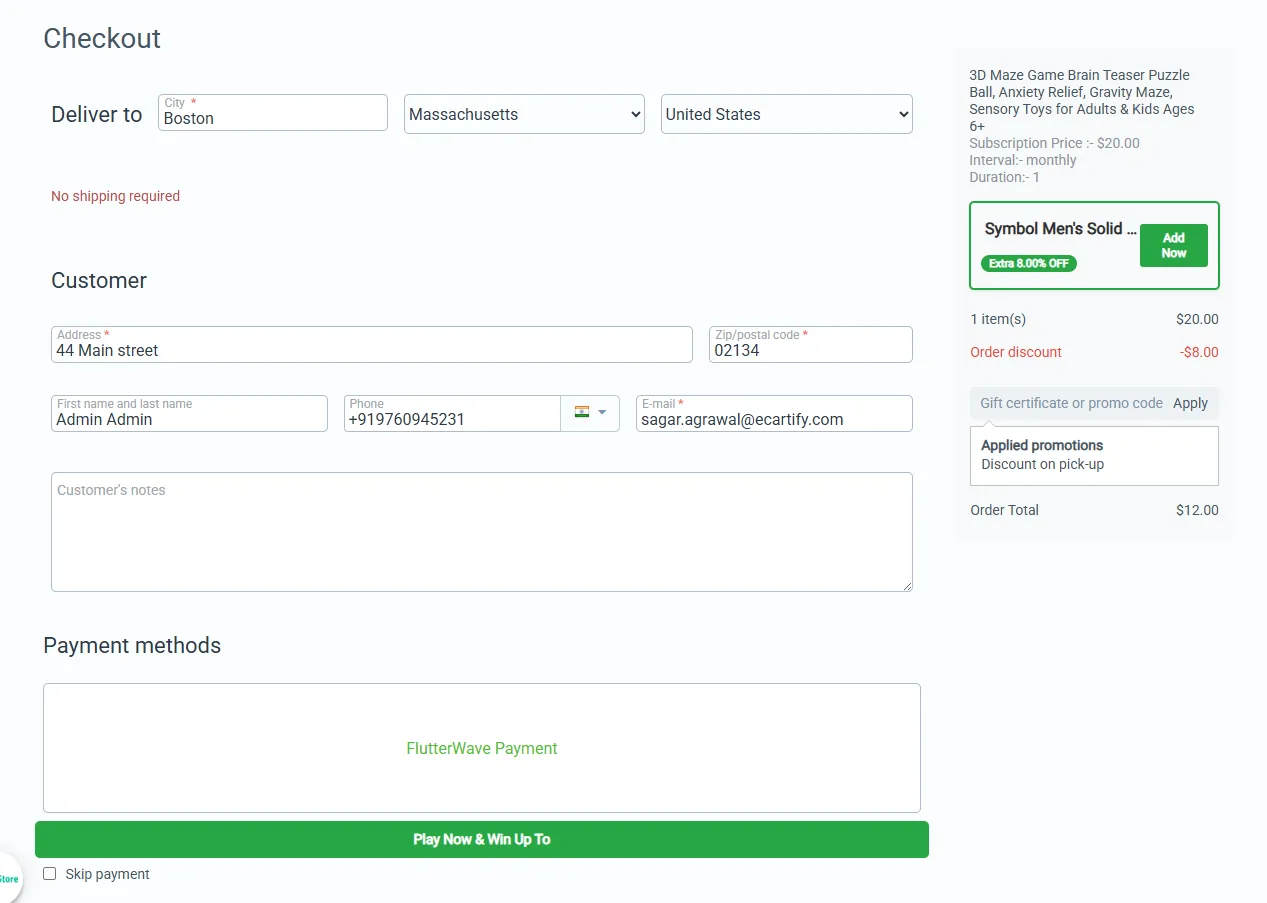
Customers receive email confirmations for the initial subscription and each recurring payment.
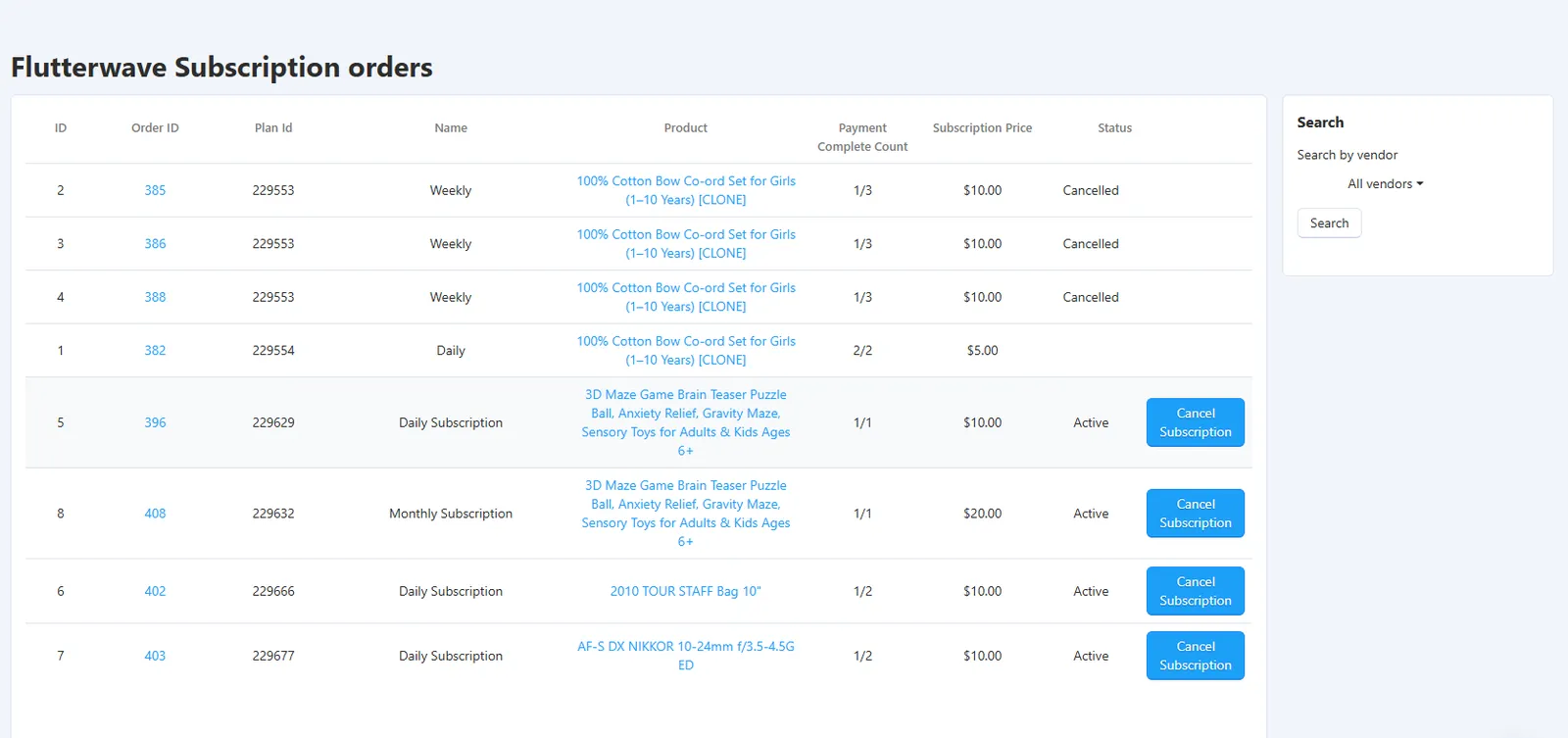
Step 5: Flutterwave Subscription Orders (Admin)
Admins can monitor and manage all subscription-based orders from a dedicated backend interface:
Dashboard Insight: The subscription order interface gives you complete visibility into your recurring revenue stream.
Who Should Use This Payment Gateway?
Flutterwave Payment Gateway with subscription support is perfect for:
Sell software licenses with monthly or yearly subscription billing built right in.
Offer premium memberships with recurring access fees and multiple tier options.
Perfect for monthly boxes, meal kits, or curated product deliveries with flexible schedules.
Monetize courses, content libraries, or premium newsletters with recurring subscriptions.
Offer maintenance plans, support packages, or ongoing services with automatic billing.
Sell both regular products and subscription items from the same store seamlessly.
If you want to build predictable recurring revenue alongside one-time sales, this payment gateway delivers everything you need.
Ecartify: Flutterwave Payment Gateway
Ecartify: Flutterwave Payment Gateway is more than just a payment processor—it's a complete subscription management system integrated seamlessly into CS-Cart.
With support for both one-time purchases and five different subscription frequencies (daily, weekly, monthly, quarterly, yearly), you get the flexibility to build any business model from simple e-commerce to complex subscription services.
If you're looking to unlock recurring revenue streams, reduce payment friction, and provide customers with flexible subscription options—all while maintaining full control through your CS-Cart admin panel—this payment gateway is absolutely essential.
Ready to Build Recurring Revenue?
Stop leaving money on the table with one-time sales only. Upgrade to Ecartify: Flutterwave Payment Gateway today and transform your CS-Cart store into a subscription-powered revenue machine with flexible billing and automated recurring payments.