
HubSpot Marketing Automation with Seamless CS-Cart Integration
Sync products, customers, orders, and campaigns automatically to supercharge your marketing efforts and grow your business faster.Ecartify: HubSpot Connector
Transform your CS-Cart marketing workflow with the HubSpot Connector. This powerful addon automatically synchronizes products, orders, customers, and marketing campaigns between your CS-Cart store and HubSpot CRM. Eliminate manual data entry, automate marketing campaigns, and maintain real-time customer insights with secure OAuth 2.0 authentication and automated synchronization.
Key Features of HubSpot Connector
Products instantly sync to HubSpot with complete details, pricing, and inventory information.
Customer data automatically syncs to HubSpot contacts for comprehensive CRM management.
Orders sync automatically as deals or timeline events in HubSpot for complete visibility.
Create and manage marketing campaigns directly from your CS-Cart admin panel.
Changes in either platform automatically reflect in the other system.
Map CS-Cart order statuses to HubSpot deal stages for accurate pipeline tracking.
Industry-standard secure authentication with encrypted data transmission.
Real-time connection status and comprehensive health diagnostics dashboard.
Step-by-Step Setup Guide
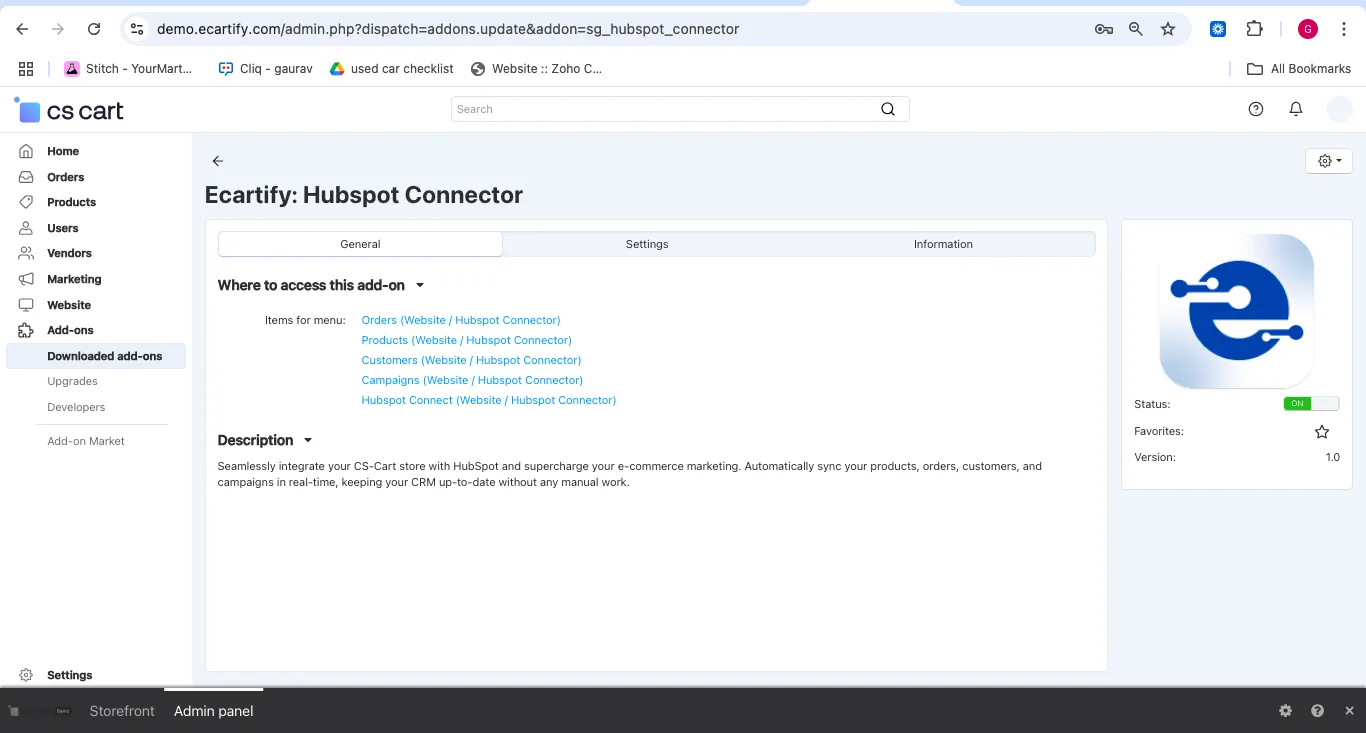
Step 1: Install the Addon
Installing the HubSpot Connector addon is simple and takes just a few minutes:
No coding knowledge required - the installation is fully automated!
Step 2: Create HubSpot Private App
Before connecting, you need to create a HubSpot Private App to obtain API credentials:
Go to your HubSpot account → Settings → Integrations → Private Apps
Click "Create a private app" and fill in your application details
Enable required scopes: contacts, deals, products, e-commerce, timeline
Once created, copy your Access Token (keep this secure!)
Step 3: Configure Authentication Settings
Configure the connection settings to securely link your store to HubSpot:
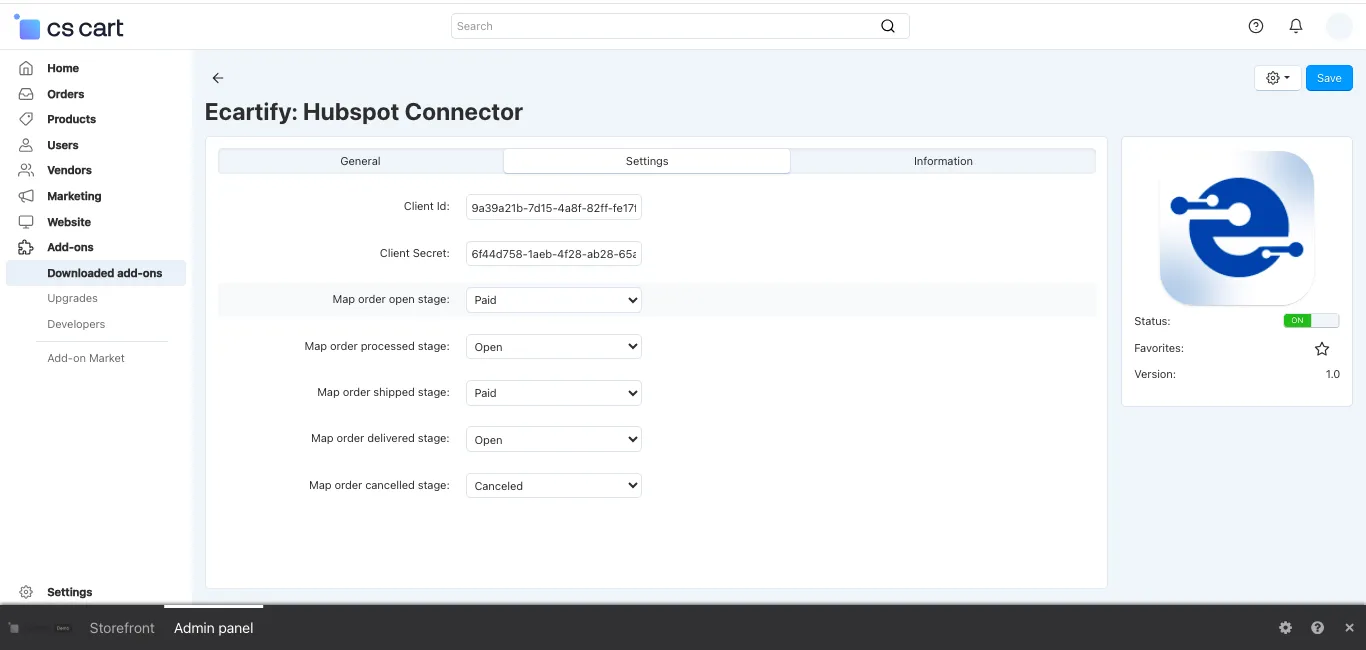
Paste your HubSpot OAuth 2.0 Client ID from the private app settings
Paste your Client Secret (keep this confidential and secure)
The addon provides a callback URL - add this to your HubSpot app settings
Click the connection button to authenticate via OAuth 2.0
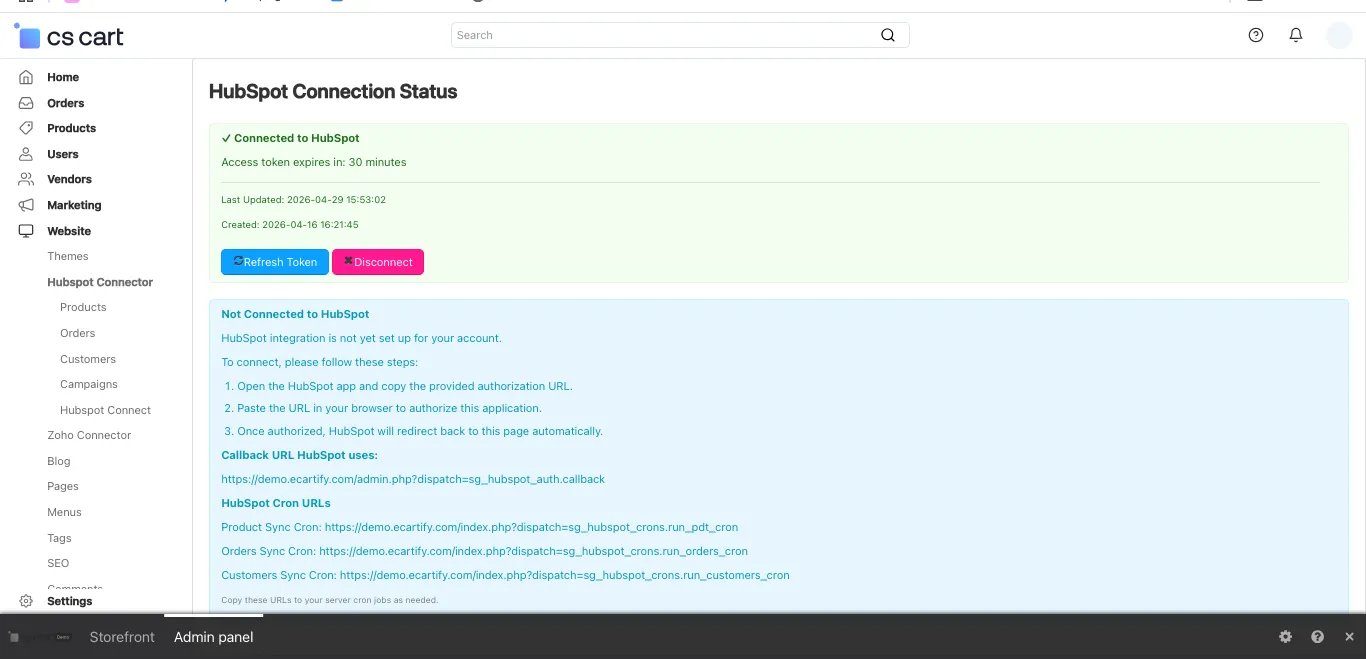
Once connected, you'll see a green "Connected to HubSpot" status with your access token expiry time!
Step 4: Configure Order Stage Mapping
Map your CS-Cart order statuses to HubSpot deal stages for accurate pipeline tracking:
Choose which HubSpot deal stage represents open orders
Select the deal stage for processed orders
Define the stage for shipped orders
Set the stage for delivered orders
Configure the stage for cancelled orders
Flexible stage mapping ensures your HubSpot sales pipeline accurately reflects your order fulfillment process!
Step 5: Test Your Connection
Verify that everything is working correctly:
View the connection status indicator and token expiry time
Use the "Refresh Token" button to renew your access when needed
Easily disconnect and reconnect if you need to change settings
The addon provides clear status indicators to ensure your integration is always running smoothly!
Step 6: Sync Products to HubSpot
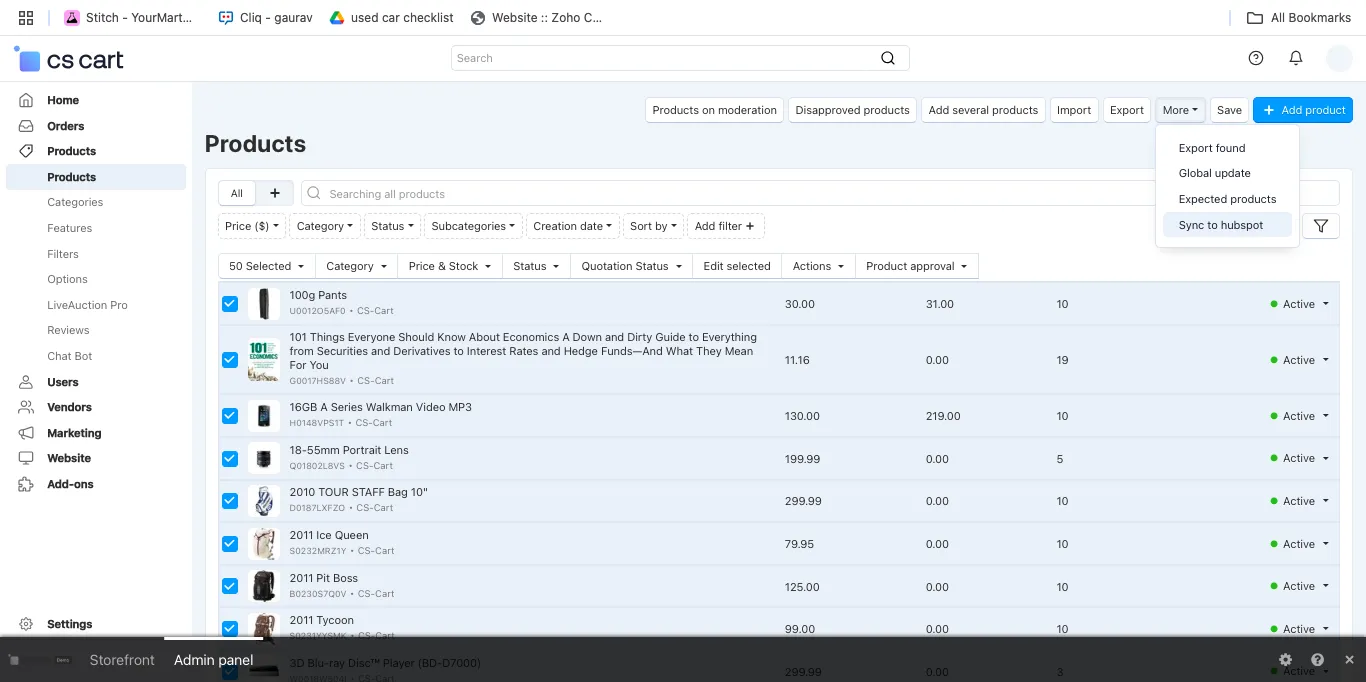
Start synchronizing your product catalog with HubSpot:
Your product catalog stays synchronized, making it easy to create targeted marketing campaigns!
Step 7: Sync Customers to HubSpot
Synchronize your customer database with HubSpot contacts:
Go to Hubspot Connector → Customers in your CS-Cart admin
Use "Add all customers for sync" to sync your entire customer base
See HubSpot IDs, email addresses, and sync timestamps
New customers automatically sync to HubSpot going forward
Step 8: Sync Orders to HubSpot
Enable order synchronization for complete sales pipeline visibility:
Access Hubspot Connector → Orders section
Click "Add all orders for sync" or select specific orders
Orders appear as deals in your HubSpot pipeline
New orders automatically create deals in HubSpot
Complete order visibility in HubSpot enables better sales forecasting and customer relationship management!
Step 9: Manage Marketing Campaigns
Create and manage HubSpot marketing campaigns directly from CS-Cart:
Go to Hubspot Connector → Campaigns
Click "+ Add Campaign" to create a new marketing campaign
See campaign IDs, creation dates, and last modified timestamps
Campaigns stay synchronized between both platforms
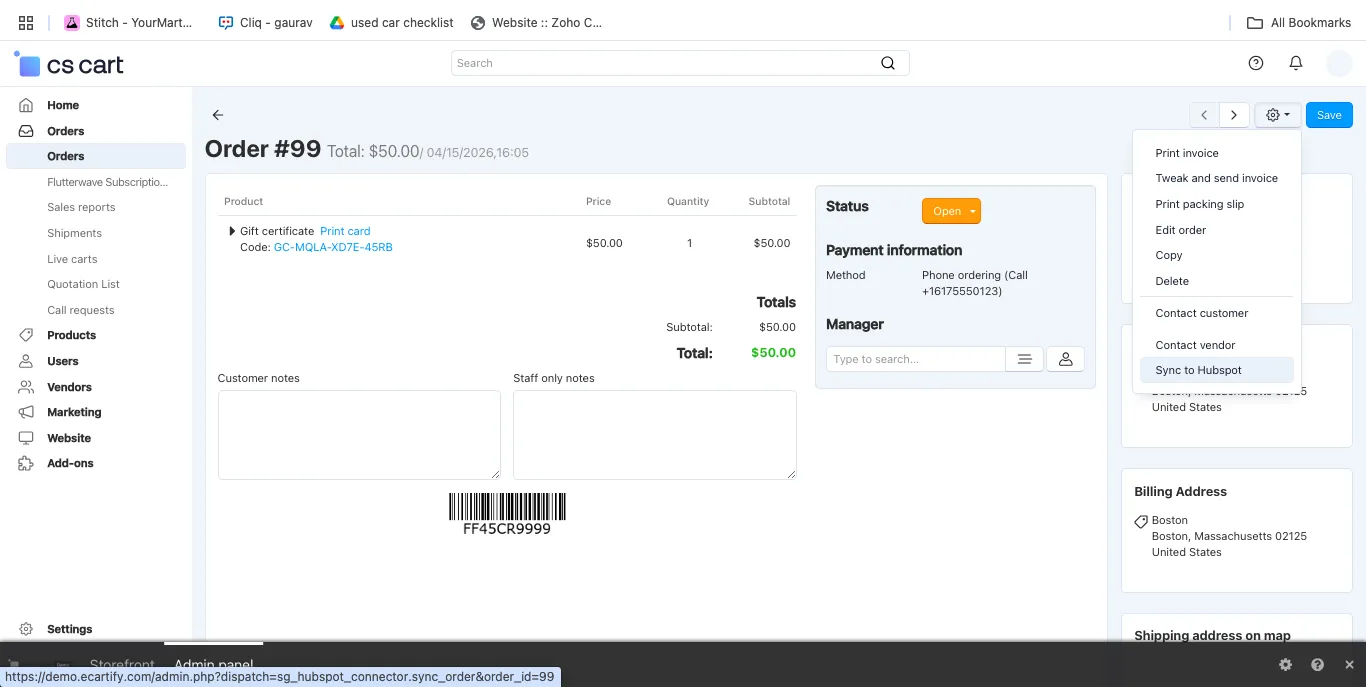
Step 10: Configure Individual Order Sync
Sync specific orders directly from the order detail page:
Navigate to any order in your CS-Cart admin
Click the gear icon and select "Sync to Hubspot"
The order immediately syncs to HubSpot as a deal
Option to update customer information simultaneously
Flexible sync options give you complete control over what and when to synchronize!
What Can You Sync?
The HubSpot Connector provides comprehensive synchronization across all major e-commerce and marketing entities:
Products → HubSpot Products
Orders → HubSpot Deals
Customers → HubSpot Contacts
Campaigns → HubSpot Campaigns
Benefits for Your Business
Marketing Automation
Enhanced Customer Insights
Time Savings
Revenue Growth
Scalability
Transform Your Marketing Workflow Today
Your HubSpot Connector is now ready to revolutionize how you manage your CS-Cart store marketing. Say goodbye to manual data synchronization, disconnected customer data, and missed marketing opportunities. With automated synchronization, you can:
Ready to supercharge your marketing? Install HubSpot Connector today and experience seamless integration between your e-commerce platform and marketing automation powerhouse!