
Zoho Connector Vendor for CS-Cart Multi-Vendor
Sync your vendor products, Zoho accounts as customers, and orders between CS-Cart and Zoho CRM, Zoho Inventory — directly from your vendor panel.Ecartify: Zoho Connector Vendor – For CS-Cart Vendors
The Ecartify Zoho Connector Vendor is a CS-Cart Multi-Vendor add-on that gives individual vendors their own dedicated Zoho integration — directly from the vendor panel. Each vendor can connect their own Zoho CRM and Zoho Inventory account, sync their own products, import Zoho Accounts (including parent and sub-accounts) as CS-Cart customers, and keep orders in sync as Zoho Sales Orders. Configure your own API credentials, OAuth connection, order status mapping, and default category/tax — all independently, without needing store admin access. Your Zoho data, your vendor panel, your control.
Key Features
Each vendor manages their own independent Zoho OAuth connection with their own Client ID, Client Secret, and Zoho Region — no shared credentials, full isolation.
Push your vendor products to Zoho Inventory and import Zoho products back into your CS-Cart vendor catalog — with pricing, SKU, stock, and descriptions kept in sync.
Import Zoho CRM Accounts directly as CS-Cart customers. Parent accounts are imported first; sub-accounts are visible but shown as read-only for reference.
Export your vendor orders to Zoho as Sales Orders. Order statuses map automatically between CS-Cart and Zoho based on your configured mapping.
Map CS-Cart order statuses (Open, Processed, Shipped, Cancelled) to Zoho Sales Order stages from within your own vendor settings tab.
Set a default CS-Cart category and default tax for products imported from Zoho into your vendor catalog — keeping your listings organized automatically.
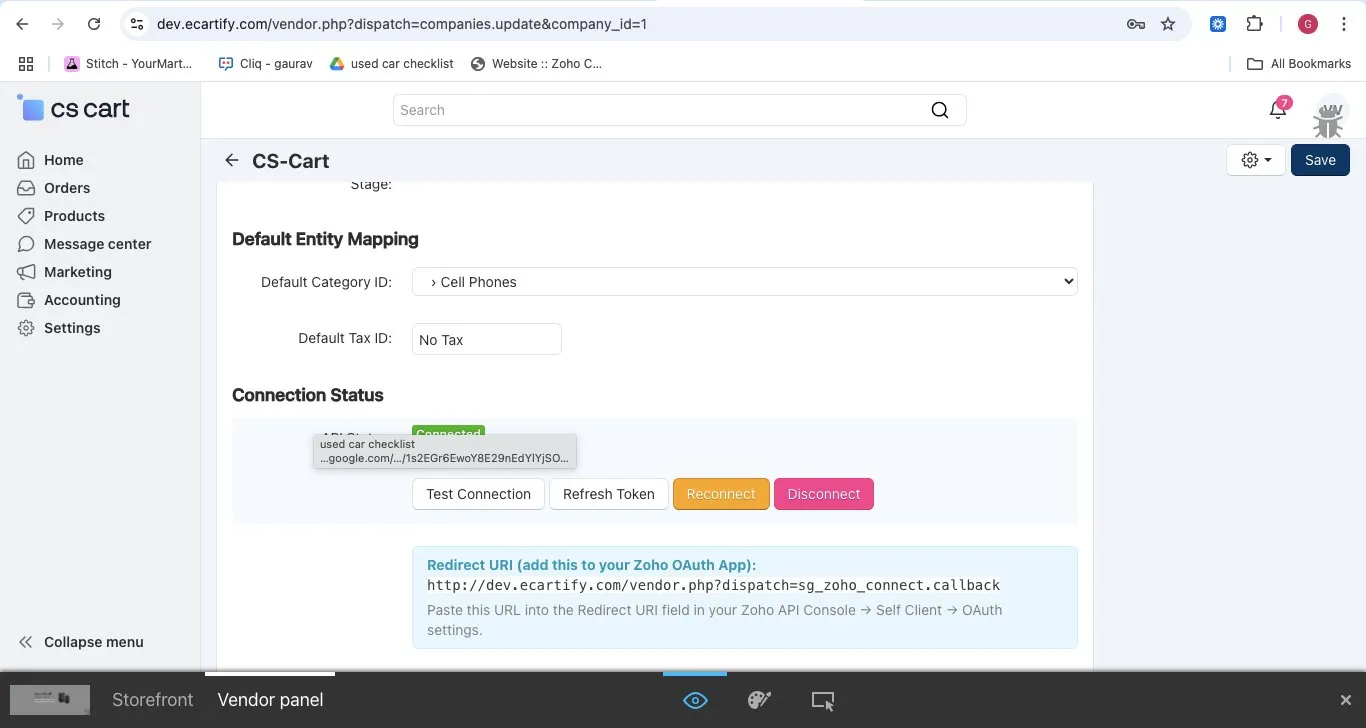
Each vendor authenticates independently via industry-standard OAuth 2.0. A unique Redirect URI is generated per vendor for use in the Zoho API Console Self-Client setup.
See your live connection status (Connected / Disconnected), Zoho Org ID, token expiry, and use Test Connection, Refresh Token, Reconnect, and Disconnect controls at any time.
Setup & Configuration Guide
Step 1: Enable the Add-on & Access Your Vendor Settings
Once the store admin has installed the Ecartify Zoho Connector Vendor add-on, you can access it from your vendor panel:
The sidebar in your vendor panel also shows quick-access links: Zoho Products, Zoho Customers, and Zoho Orders under the Marketing section.
Step 2: Create a Zoho Self-Client App & Enter Your Credentials
You need your own Zoho API Self-Client to generate a Client ID and Client Secret for your Zoho account:
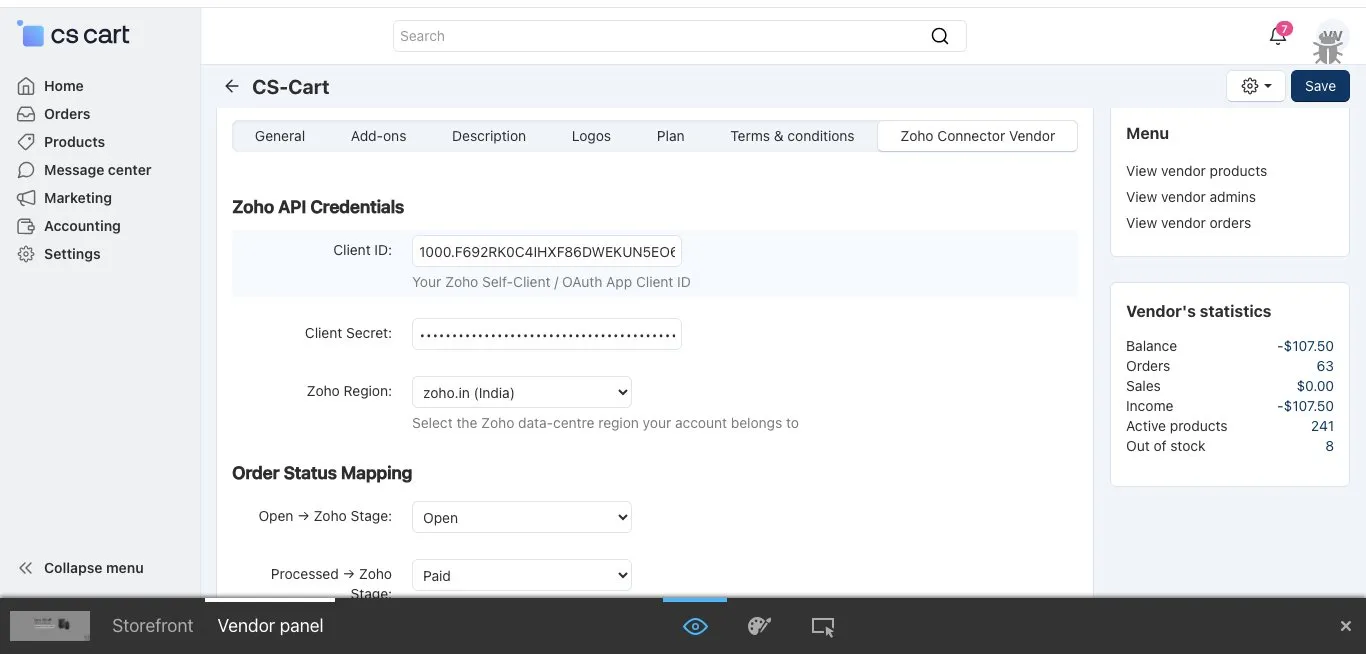
Click Save (top-right) to store your credentials securely. Credentials are stored per-vendor and never shared with other vendors.
Step 3: Configure Order Status & Default Mappings
In the same Zoho Connector Vendor tab, configure how your CS-Cart order statuses map to Zoho Sales Order stages and set your product import defaults:
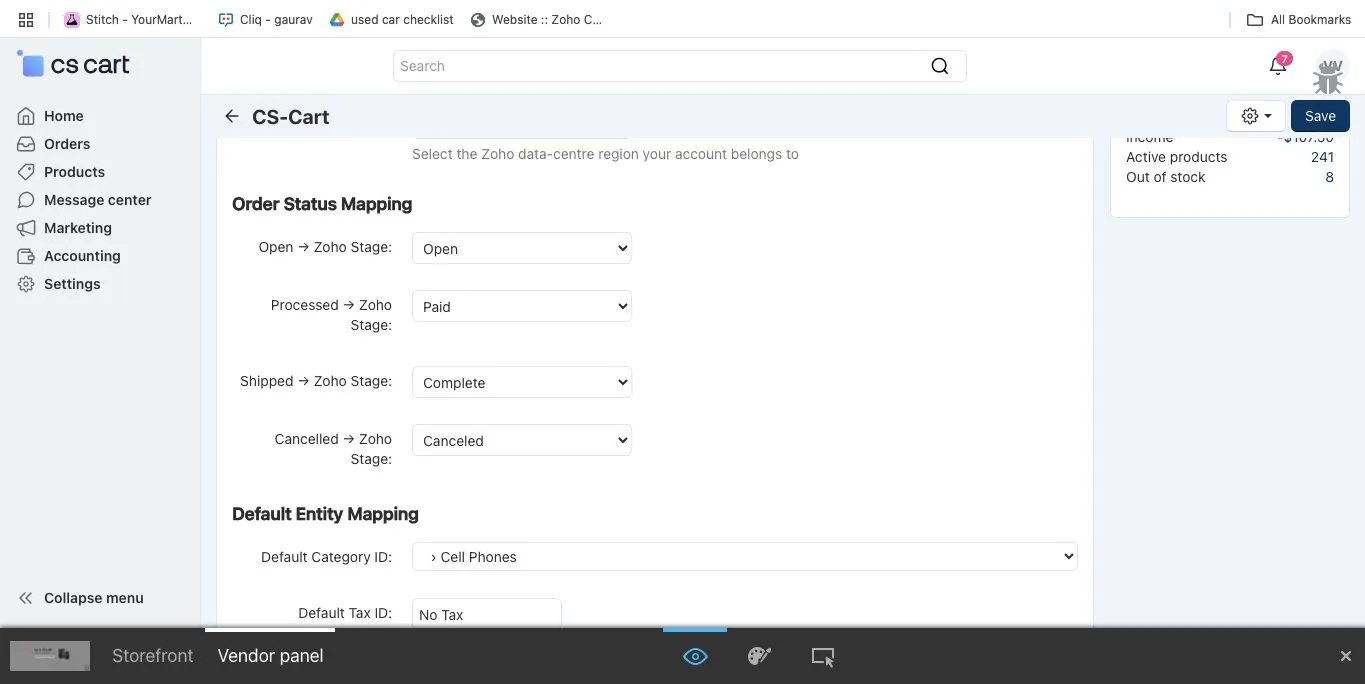
Click Save in the top-right to apply all mappings. These settings apply only to your vendor account.
Step 4: Authorize the OAuth Connection
Complete the OAuth 2.0 handshake to connect your vendor account to Zoho:
Step 5: Sync Your Vendor Products to Zoho
Push your vendor product catalog into Zoho Inventory from the Zoho Products dashboard in your vendor panel:
Step 6: Import Zoho Products into Your Vendor Catalog
Browse all your Zoho Inventory products and import the ones that are not yet in your CS-Cart vendor catalog:
Step 7: View Zoho Accounts as Customers (Parent & Sub-Accounts)
The Zoho Customers section lets you browse and import Zoho CRM Accounts as CS-Cart customers. Accounts follow a parent–child hierarchy:
Sub-accounts are intentionally shown as read-only to maintain data integrity. Import the parent account first; sub-accounts are visible for your reference and relationship context.
Step 8: Sync Your Vendor Orders to Zoho
Push your CS-Cart vendor orders to Zoho as Sales Orders and keep them in sync:
What Gets Synchronized?
A full overview of data flowing between your CS-Cart vendor catalog and Zoho:
Your Products ↔ Zoho Inventory
Zoho CRM Accounts → CS-Cart Customers
Your Orders ↔ Zoho Sales Orders
Per-Vendor OAuth Connection
How This Helps Your Vendor Business
Manage Your Zoho Integration Independently
Unified Inventory & CRM for Vendors
Flexibility & Full Control
Your Data is Secure
Common Questions
Is this for store admins or vendors?
This is a vendor-level add-on. It gives each individual vendor their own Zoho integration from within the vendor panel. The store admin is not involved in the vendor's sync operations.
Can each vendor have their own Zoho account?
Yes. Every vendor enters their own Client ID, Client Secret, and selects their own Zoho Region. Each vendor's OAuth connection is completely independent — one vendor's Zoho account has no relation to another's.
Why are sub-accounts shown as read-only?
Sub-accounts (Zoho Accounts that belong to a parent) are displayed for reference and relationship context. They are shown as read-only and cannot be imported independently — the parent account must be imported first to maintain the account hierarchy.
Can I import products from Zoho into my vendor catalog?
Yes. The Zoho Products dashboard shows a "Not in CS-Cart" count. Click it to view all your Zoho Inventory products not yet in your catalog and import them individually or in bulk — with all product details brought across automatically.
What if a Zoho account has no email address?
A placeholder email is auto-generated so the import does not fail. The Zoho Customers browser clearly flags these records with a "No email" badge so you can review and update them after import.
Can I disconnect from Zoho at any time?
Yes. Click Disconnect in the Connection Status section to revoke your OAuth token instantly. All your existing CS-Cart vendor data remains completely intact. You can reconnect at any time using the Reconnect button.
Do I have to sync everything at once?
No. Products, Customers, and Orders are completely independent. You can sync only products, or only import Zoho accounts as customers, without touching orders. It is fully flexible based on your business needs.
Where do I find the Redirect URI for Zoho setup?
The Redirect URI is shown in a blue info box at the bottom of the Zoho Connector Vendor tab in your vendor panel. Copy it and add it to your Zoho API Console → Self Client → OAuth settings before authorizing.
Ready to Connect Your Vendor Store with Zoho?
The Ecartify Zoho Connector Vendor is the dedicated Zoho integration built specifically for CS-Cart Multi-Vendor sellers. From your own vendor panel, you get full control over syncing your products, importing Zoho CRM accounts as customers, and keeping your orders flowing into Zoho as Sales Orders — all with your own secure OAuth connection.
What you gain as a vendor:
✓ Independent Zoho OAuth connection per vendor
✓ Product sync between your CS-Cart catalog & Zoho Inventory
✓ Zoho CRM Accounts imported as CS-Cart customers
✓ Parent accounts imported; sub-accounts shown read-only
✓ Order sync with configurable status mapping
✓ Default category & tax mapping for imported products
✓ Test Connection, Refresh Token & Disconnect controls
✓ Works with Zoho CRM & Zoho Inventory
Start syncing your vendor store with Zoho today!